Java 8 Stream Performance Test
Counting in a loop eight different ways, from synchronized blocks to parallel streams, to compare Java 8 Stream performance.
From the archive: I wrote this in 2014, so some tools and details may be out of date.
I have been recently testing out new features in JDK8. I think one of the most interesting feature which is available other than Lamda is Stream (java-doc). In summery it gives you a good way to do functional style of programming on Java collection, also it has something extra, it allows you to run operations in serial or parallel which in return allows developers to easily code parallel programming without needing to worry about complex programming logic.
I wanted to test the Stream performance for that I’m going to use a simple loop counter (source-code)
1. Normal (Serial)
    public static long serialSum() {
        long sum = 0;
        for (int i = 0; i < LIMIT; i++) {
            sum += i;
        }
        return sum;
    }
2. Synchronized Object reference (Parallel)
    public static long parallelObjectSynchronised() {
        final ObjectSynchronisedCounter counter = new ObjectSynchronisedCounter();
        CountDownLatch countDownLatch = new CountDownLatch(NUMBER_OF_PROCESSORS);
        long totalPerThread = LIMIT / NUMBER_OF_PROCESSORS;
        for (int i = 0; i < NUMBER_OF_PROCESSORS; i++) {
            final int finalI = i;
            executors.execute(() -> {
                for (int j = (int) (totalPerThread * finalI); j < (totalPerThread * (finalI + 1)); j++) {
                    synchronized (Java8PerfTest.class) {
                        counter.sum += j;
                    }
                }
                countDownLatch.countDown();
            });
        }
        try {
            countDownLatch.await();
        } catch (InterruptedException e) {
            e.printStackTrace();
        }
        return counter.sum;
    }
3. Synchronised Array reference (Parallel)
    public static long parallelArraySynchronised() {
        final long[] sum = {0};
        CountDownLatch countDownLatch = new CountDownLatch(NUMBER_OF_PROCESSORS);
        long totalPerThread = LIMIT / NUMBER_OF_PROCESSORS;
        for (int i = 0; i < NUMBER_OF_PROCESSORS; i++) {
            final int finalI = i;
            executors.execute(() -> {
                for (int j = (int) (totalPerThread * finalI); j < (totalPerThread * (finalI + 1)); j++) {
                    synchronized (Java8PerfTest.class) {
                        sum[0] += j;
                    }
                }
                countDownLatch.countDown();
            });
        }
        try {
            countDownLatch.await();
        } catch (InterruptedException e) {
            e.printStackTrace();
        }
        return sum[0];
    }
4. Atomic (Serial)
    public static long serialAtomic() {
        AtomicLong aLong = new AtomicLong();
        for (int i = 0; i < LIMIT; i++) {
            aLong.addAndGet(i);
        }
        return aLong.get();
    }
5. Atomic (Parallel)
    private static long parallelAtomic() {
        AtomicLong sum = new AtomicLong();
        CountDownLatch countDownLatch = new CountDownLatch(NUMBER_OF_PROCESSORS);
        long totalPerThread = LIMIT / NUMBER_OF_PROCESSORS;
        for (int i = 0; i < NUMBER_OF_PROCESSORS; i++) {
            final int finalI = i;
            executors.execute(() -> {
                for (int j = (int) (totalPerThread * finalI); j < (totalPerThread * (finalI + 1)); j++) {
                    sum.addAndGet(j);
                }
                countDownLatch.countDown();
            });
        }
        try {
            countDownLatch.await();
        } catch (InterruptedException e) {
            e.printStackTrace();
        }
        return sum.get();
    }
6. Stream (Serial)
    public static long serialRange() {
        return LongStream.range(1, LIMIT)
                .sum();

    }
7. Stream (Parallel)
    public static long parallelRange() {
        return LongStream.range(1, LIMIT)
                .parallel()
                .sum();

    }
8. If the Developer puts in the effort
    public static long parallelSmart() {
        CountDownLatch countDownLatch = new CountDownLatch(NUMBER_OF_PROCESSORS);
        long totalPerThread = LIMIT / NUMBER_OF_PROCESSORS;
        Future<Long>[] fu = new Future[NUMBER_OF_PROCESSORS];
        for (int i = 0; i < NUMBER_OF_PROCESSORS; i++) {
            final int finalI = i;
            fu[i] = executors.submit(() -> {
                long sum = 0;
                for (int j = (int) (totalPerThread * finalI); j < (totalPerThread * (finalI + 1)); j++) {
                    sum += j;
                }
                countDownLatch.countDown();
                return sum;
            });
        }
        long sum = 0;
        try {
            countDownLatch.await();
            for (Future<Long> aFu : fu) {
                sum += aFu.get();
            }
        } catch (Exception e) {
            e.printStackTrace();
        }
        return sum;
    }
Following is the results when running it from my laptop
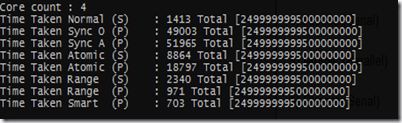
As you can clearly see, a good developer can right a fast code, but its a game between Simplicity vs Performance.