SMS UDH, Binary and Concatenated Messages
How the User Data Header works for binary and concatenated SMS, with Nokia Smart Messaging port numbers and EMS examples.
From the archive: I wrote this in 2010, so some tools and details may be out of date.
As a standard SMS can only contain 160 7-bit GSM characters, Concatenated SMS are used to send long SMS which are bigger then 160 characters. Concatenation allows a sender to send more than one SMS which then get stuck together automatically by the phone to appear as one message.
To indicate that the content contains a UDH, a flag on the SMS called the UDH Indicator (UDHI) must be turned on. This tells the phone that it must separate the UDH from the rest of the content.
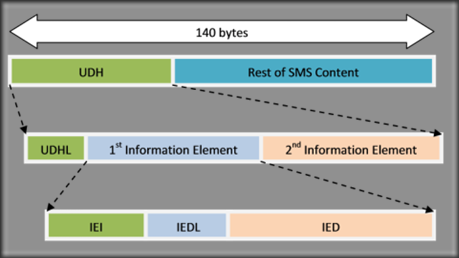
Format of an SMS with a UDH
The phone separates the UDH by reading the first byte of the content. The number in this byte is the length of the rest of UDH and is called the User Data Header Length (UDHL). The phone then knows how many bytes make up the UDH and can separate it from the rest of the message.
There are two main kind of SMS systems one is Smart Messaging which is for NOKIA supported and sets (include almost all brand except older version of Sony and Ericsson), and other one is EMS (Enhanced messaging system), both have different type of content and UDH encoding , first with the common between them.
- both have same algo to build UDH .
- data and udh for both systems are only in hex i.e char having 0-9 or A-F.
- both have same Header for split messages i.e. concatenated messages, for nokia it goes like for each binary messages there is data and UDH part now Nokia identifies coming binary message as ringtone, pic ,logo etc because of port number present in its header, lets consider full UDH of Nokia
The full UDH for a Nokia ringtone is 06 05 04 1581 1581. 06 is the length of the whole UDH i.e 6 octet now each octet has two char so 050415811581 counts to 6 octet, got it?, now 05 - it represents as keyword for 16-bit nokia port addressing(according to specs of smart messaging) 04 - its again count of upcoming octets i.e. 4 , 1581 - it is destination port mentioning port number in hex for ringtone, in other words this the thing which identifies upcoming message as ringtone. 1581 - it is source port , when a ringtone is sent from handset to handset it automatically becomes 1581, but when you send it via GSM modem or SMPP connection it can be assigned to any valid hex string, preferably 0000.
so instead of ringtone if we are sending picture message, or logo or anything else then we just have to change destination port number for different binary messages it is as follows
| Message type | Destination port |
|---|---|
| Ringtone | 1581 |
| CGI / CLI | 1583 |
| Picture message | 158A |
| Operator logo | 1582 |
| vCard | 23F4 |
| vCard secure | 23F6 |
| vCalendar | 23F5 |
| vCalendar secure | 23F7 |
| Email notification | 1588 |
| DMCP (obsolete) | 1584 |
now if our message is bigger than preferably 260 chars we need to break it into more than one part ,, that’s called concatenation for that you need to append concat header in UDH which goes like
00 03 XX 0N 0nit looks confusing but let me explain it , 00 is offset to mention its new part of UDH
03 is according to specs concat header
XX it can be from 00 to FF , it is called message reference header , its same in UDH of all splited message in order to make receiving body understand that incoming splitted message is part of earlier received message because it has same reference string, get it??
0N represents total count of messages, like after splitting there are 3 parts then it is 03 , so here u can deduce that SMS support maximum 255 splits, becoz 25 if FF and it is largest 2 digit hex number. 0n represents sequence number of upcoming sms part like for first part it will be 01 for next it will be 02 and so on up to 0N,
now there is somthing u should take care of when we append concat header whole UDH becomes of 22 char i.e. 11 octets so UDH begins with 0B instead of 06 so for an SMS of 3 splits of ringtone type, the UDHs will be:
0B0504158115810003AF0301
0B0504158115810003AF0302
0B0504158115810003AF0303
This is all about Smart Messaging. Now EMS is even simpler: there is no data part in EMS, everything is bundled together in the UDH. It looks like this:
XX0CXX00<data hex string>The first XX is the length of the total data, 0C is the EMS octet for a melody sound according to the specs, the second XX is the length of the rest of the data, and 00 is the offset that marks the start of the data part. The data part is the hex form of an iMelody string. Concatenation works the same way in EMS as described above, so just append 0003XX0N0n before the 00 offset, count the characters and adjust accordingly.